AI tools audited across the design pipeline
Ideation through production
Figma Plugin
Figma Plugin
Figma Plugin
AI Design Navigator
AI Design Navigator
AI Design Navigator
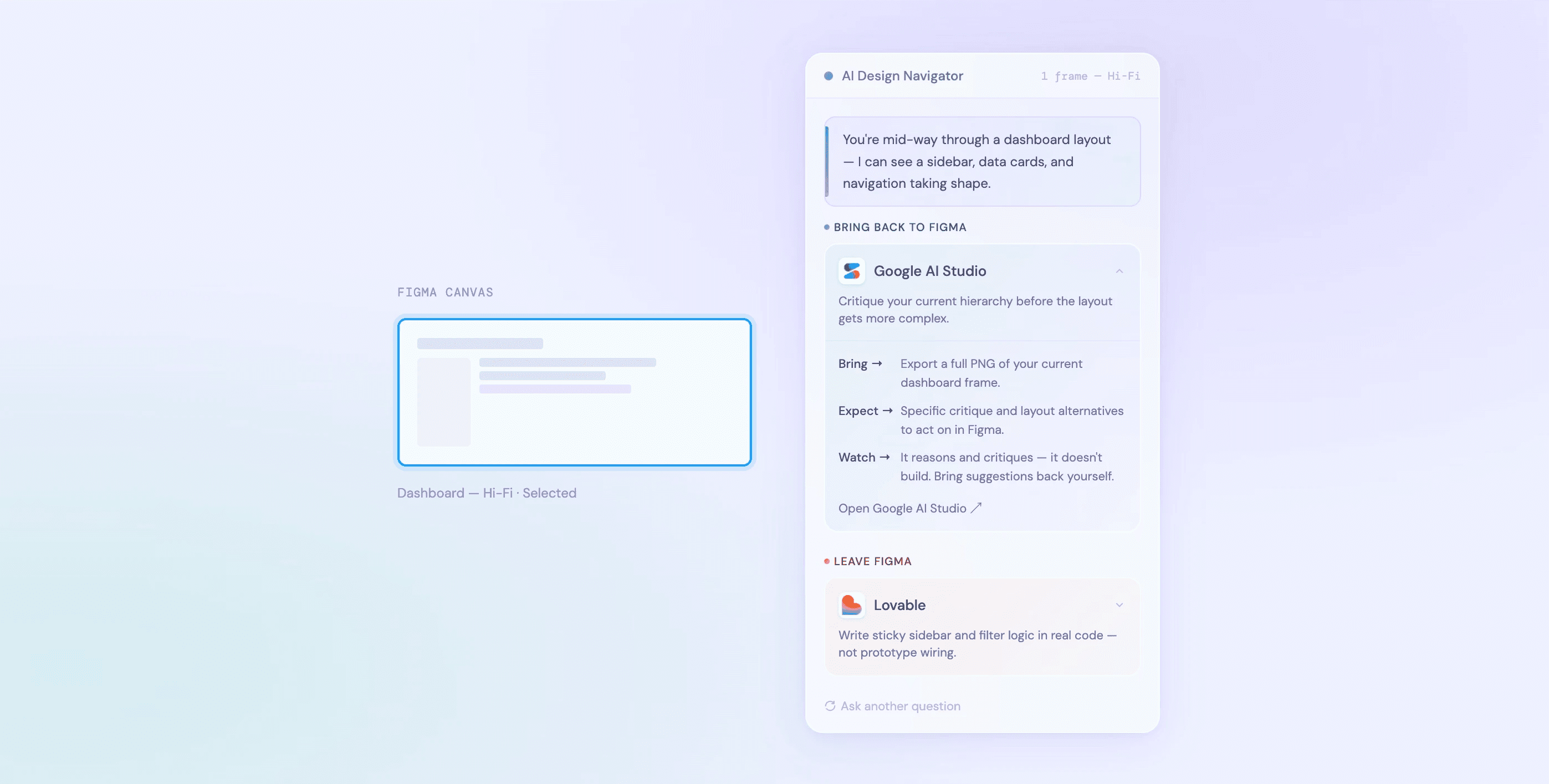
AI Design Navigator — plugin panel inside Figma. Recommendations are grounded in primary research and updated via live web search.
The Problem
The Problem
The Problem
The AI tool landscape has grown faster than
the guidance around it.
The AI tool landscape has grown faster than
the guidance around it.
By 2025, designers had access to a significant and growing number of AI tools spanning every stage
of the design process. Each well-documented in isolation.
None positioned relative to each other, or to the actual workflow decisions a designer faces mid-project.
The result : designers know the tools exist, but lack a clear framework for when to reach for them, what switching environments actually costs, and whether the move is worth it for the specific task at hand.
By 2025, designers had access to a significant and growing number of AI tools spanning every stage
of the design process. Each well-documented in isolation.
None positioned relative to each other, or to the actual workflow decisions a designer faces mid-project.
The result : designers know the tools exist, but lack a clear framework for when to reach for them, what switching environments actually costs, and whether the move is worth it for the specific task at hand.
By 2025, designers had access to a significant and growing number of AI tools spanning every stage
of the design process. Each well-documented in isolation.
None positioned relative to each other, or to the actual workflow decisions a designer faces mid-project.
The result : designers know the tools exist, but lack a clear framework for when to reach for them, what switching environments actually costs, and whether the move is worth it for the specific task at hand.

Above : Browser with 10+ AI tool tabs open
Above : Browser with 10+ AI tool tabs open
Above : Browser with 10+ AI tool tabs open
The Research
The Research
The Research
Two semesters of primary research - same prompt, every tool
Two semesters of primary research - same prompt,
every tool
As a Graduate Assistant at RIT, I conducted structured research into AI tools across the UI/UX design
workflow over two semesters. Semester 1 focused on tool evaluation - many tools tested against a
standardized prompt, rated across criteria.
As a Graduate Assistant at RIT, I conducted structured research into AI tools across the UI/UX design workflow over two semesters. Semester 1 focused on tool evaluation - many tools tested against a standardized prompt, rated across criteria.
As a Graduate Assistant at RIT, I conducted structured research into AI tools across the UI/UX design
workflow over two semesters. Semester 1 focused on tool evaluation - many tools tested against a
standardized prompt, rated across criteria.
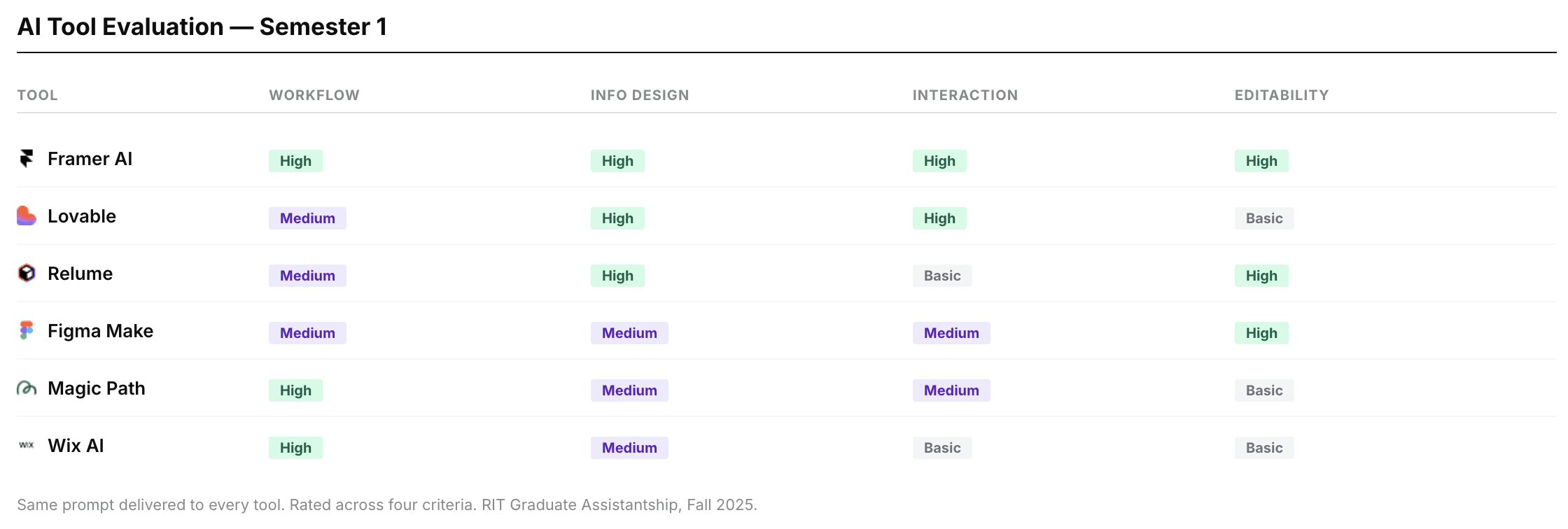
Above : Some of the tools evaluated on several criteria.
Above : Some of the tools evaluated on several criteria.
Above : Some of the tools evaluated on several criteria.
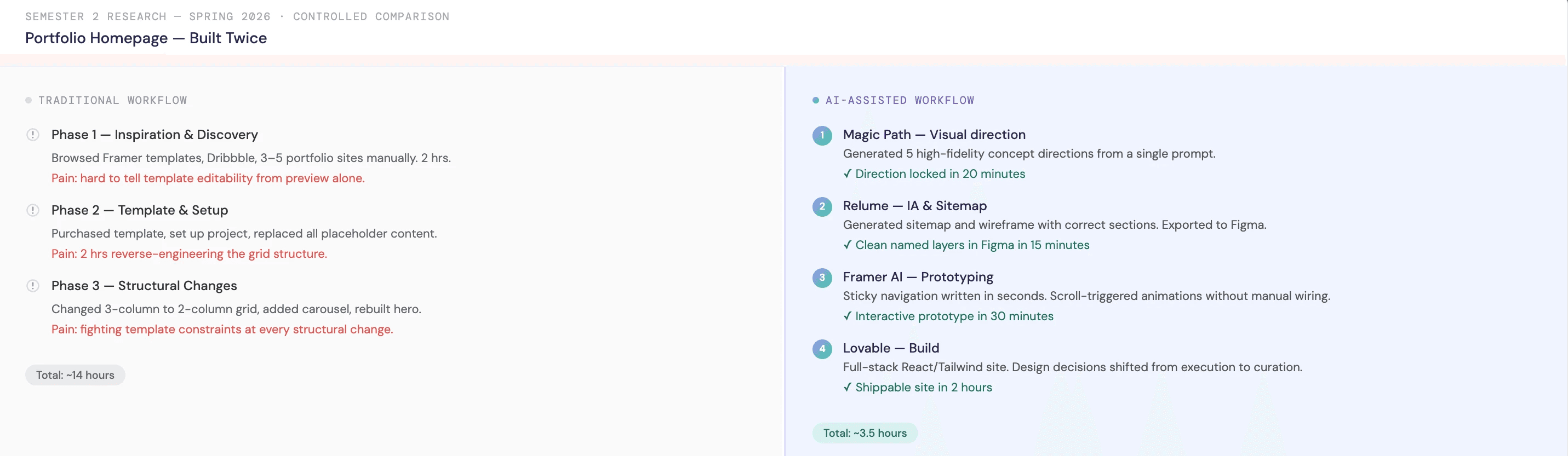
Semester 2 extended the research through a controlled comparison - the same product designed twice, once
through a traditional workflow and once AI-assisted. Every decision, friction point, and time difference was documented.
Semester 2 extended the research through a controlled comparison - the same product designed twice, once through a traditional workflow and once AI-assisted. Every decision, friction point, and time difference was documented.
Semester 2 extended the research through a controlled comparison - the same product designed twice, once
through a traditional workflow and once AI-assisted. Every decision, friction point, and time difference was documented.
Above : Some of the tools evaluated on several criteria.
Above : Some of the tools evaluated on several criteria.
The Plugin
The Plugin
The Plugin
A recommendation engine embedded in designer's workflow
A recommendation engine embedded in
designer’s workflow
The plugin reads the selected frame, infers the design stage, and prompts the designer with a single open question. No dropdowns. No stage selectors. Recommendations are generated from the primary research database and supplemented by live web search - ensuring the tool stays current as the landscape evolves.
The plugin reads the selected frame, infers the design stage, and prompts the designer with a single open question. No dropdowns. No stage selectors. Recommendations are generated from the primary research database and supplemented by live web search - ensuring the tool stays current as the landscape evolves.
The plugin reads the selected frame, infers the design stage, and prompts the designer with a single open question. No dropdowns. No stage selectors. Recommendations are generated from the primary research database and supplemented by live web search - ensuring the tool stays current as the landscape evolves.
The output is structured around one key decision that the research surfaced as the most consequential: whether the recommended tool requires leaving Figma permanently, or whether the designer returns with an artifact to continue work here.
The output is structured around one key decision that the research surfaced as the most consequential: whether the recommended tool requires leaving Figma permanently, or whether the designer returns with an artifact to continue work here.
The output is structured around one key decision that the research surfaced as the most consequential: whether the recommended tool requires leaving Figma permanently, or whether the designer returns with an artifact to continue work here.
Interaction - from frame selection to recommendation process
Interaction - from frame selection to recommendation process
Interaction - from frame selection to recommendation process

Above : Some of the tools evaluated on several criteria.
Above : Some of the tools evaluated on several criteria.
Mapping tools to five design stages felt logical — until I asked what a designer actually needs to know before switching. Not which stage they're in. Whether they're coming back to Figma. That reframe collapsed five categories into two.
Designers as Toolmakers
Designers as Toolmakers
Designers as Toolmakers
Decisions worth explaining
Decisions worth explaining

The entire design system with component states.
The entire design system with component states.
The entire design system with component states.
Design System
Design System
Design System
This is a tool for designers. It was judged accordingly. The system was scoped to match the
audience's threshold for visual and interaction quality - 4px spacing grid, two distinct
gradient languages tied to the two output categories, and an icon set where each mark
carries a single idea.
This is a tool for designers. It was judged accordingly. The system was scoped to match the
audience's threshold for visual and interaction quality - 4px spacing grid, two distinct
gradient languages tied to the two output categories, and an icon set where each mark
carries a single idea.
This is a tool for designers. It was judged accordingly. The system was scoped to match the
audience's threshold for visual and interaction quality - 4px spacing grid, two distinct
gradient languages tied to the two output categories, and an icon set where each mark
carries a single idea.
Key Takeaways
Key Takeaways
Key Takeaways
01. Research is only useful if it becomes something.
Two semesters of findings lived in a slide deck. Building the plugin forced every finding to become a decision.
02. Scope is a design decision.
Knowing what to leave out, and being honest about it in the product itself was more important than adding another feature.
03. AI amplifies the designer's intent.
It cannot replace the designer's taste. Every recommendation this plugin makes is only as good as the judgment the designer brings to the conversation.
01. Research is only useful if it becomes something.
Two semesters of findings lived in a slide deck. Building the plugin forced every finding to become a decision.
02. Scope is a design decision.
Knowing what to leave out, and being honest about it in the product itself was more important than adding another feature.
03. AI amplifies the designer's intent.
It cannot replace the designer's taste. Every recommendation this plugin makes is only as good as the judgment the designer brings to the conversation.
01. Research is only useful if it becomes something.
Two semesters of findings lived in a slide deck. Building the plugin forced every finding to become a decision.
02. Scope is a design decision.
Knowing what to leave out, and being honest about it in the product itself was more important than adding another feature.
03. AI amplifies the designer's intent.
It cannot replace the designer's taste. Every recommendation this plugin makes is only as good as the judgment the designer brings to the conversation.